The SNOW address that works now (checked 2 Nov 2026)
We typed the address into desktop Chrome, logged in and opened the lobby, VIP club, bonus market, deposit window and support centre in turn. Every path in the table below opened at that time.
Services run from abroad can change their address. Typing the domain yourself is safer than tapping links from search results or messengers. The table reflects the check date, so re-check if that date is old.
| Purpose | Address | Note |
|---|---|---|
| Main lobby | snsn1.com/ko | Korean lobby |
| VIP club | snsn1.com/ko/promotions/vip | Tiers, payback, rebates |
| Bonus market | snsn1.com/ko/promotions/bonus-market | Point and cash boxes |
| Provably fair | snsn1.com/ko/provably-fair | How wheel draws are verified |
| Support | snsn1.com/ko/support | 1:1 enquiries |
Legal points to check before using it
It may be illegal where you live, and it is for residents of Korea. Korean Criminal Act Art. 246: gambling is punishable by a fine of up to KRW 10 million (momentary amusement excepted); habitual gambling by up to 3 years in prison or a KRW 20 million fine. Playing on an overseas site is not an exception (Korean National Law Information Center).
Article 2 of SNOW’s own terms (version 2026-10-18.4) says the service may not be used where online casinos are illegal and that masking your location with a VPN gets the account suspended. The same terms name the operator only as ‘the company operating the Snow service’, with no company name, country of registration or licence number.
This page documents the real screens; listing the steps is not a recommendation to play. If gambling is hurting you, Gambling Therapy runs confidential online support with no waiting list (gamblingtherapy.org); in Korea, call 1336.
Six ways to tell the real SNOW address

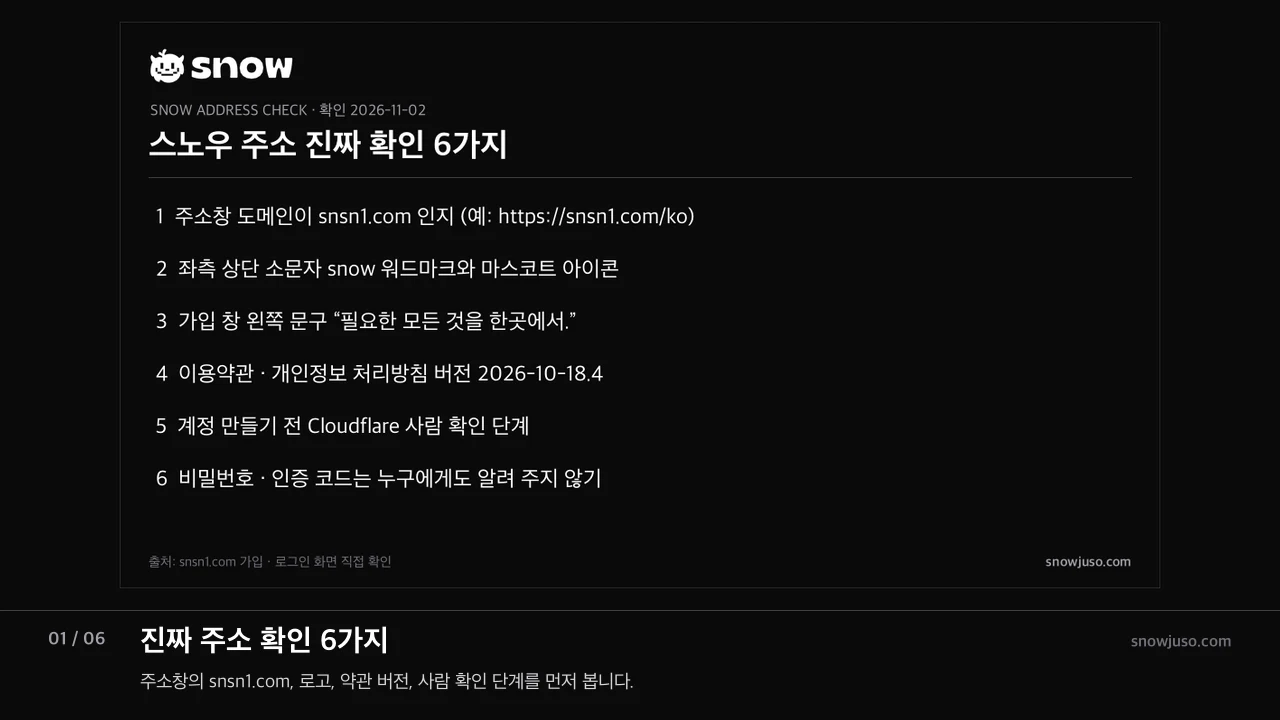
- The domain (the deciding check). Check that it is spelled snsn1.com. A page can be copied pixel for pixel; a domain cannot. Look twice at near-identical spellings, extra hyphens and shortened URLs before opening them.
- The logo. A lower-case ‘snow’ wordmark sits next to a mascot face icon, top left.
- The sign-up panel. The left side of the sign-up and login windows shows the line ‘필요한 모든 것을 한곳에서.’ (‘Everything you need, in one place.’) above a picture of a safe.
- The terms version. Under the sign-up form, the terms and privacy policy are labelled 2026-10-18.4. The number changes when they are revised, so look for the year-month-day.revision pattern.
- The security check. A Cloudflare human-verification box appears above ‘Create account’, and the button stays locked until it passes.
- Requests for codes. Never give a password or verification code to anyone who asks by message or text, whoever they claim to be. A two-factor code is something you type in yourself when logging in.
Signing up for SNOW in six steps (real screens)
Type snsn1.com/ko into the address bar
The top of the lobby shows three banners, with Log in and Sign up at the top right: ‘100,000원 보너스’ (a KRW 100,000 bonus), ‘Enjoy the live casino’ and ‘Benefits only for VIPs’. When we checked, the bonus terms page was marked ‘coming soon’, so we record only the banner wording here.
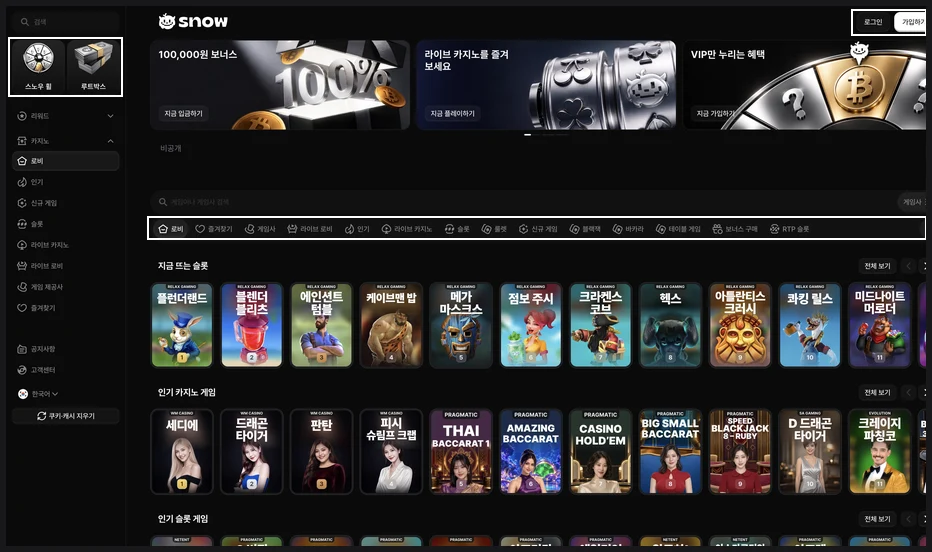
▲ SNOW lobby while logged out: three banners at the top and the Log in and Sign up buttons at the top right Press Sign up
The ‘Create account’ window opens. If you already have an account, the ‘Log in’ link at the top of the same window takes you straight there.
Use Telegram or fill in four fields
Either press ‘Sign up with Telegram’ at the top or complete username, password, confirm password and nickname. Your nickname shows up where other members can see it, such as the VIP leaderboard, so pick one that is not your username or real name.
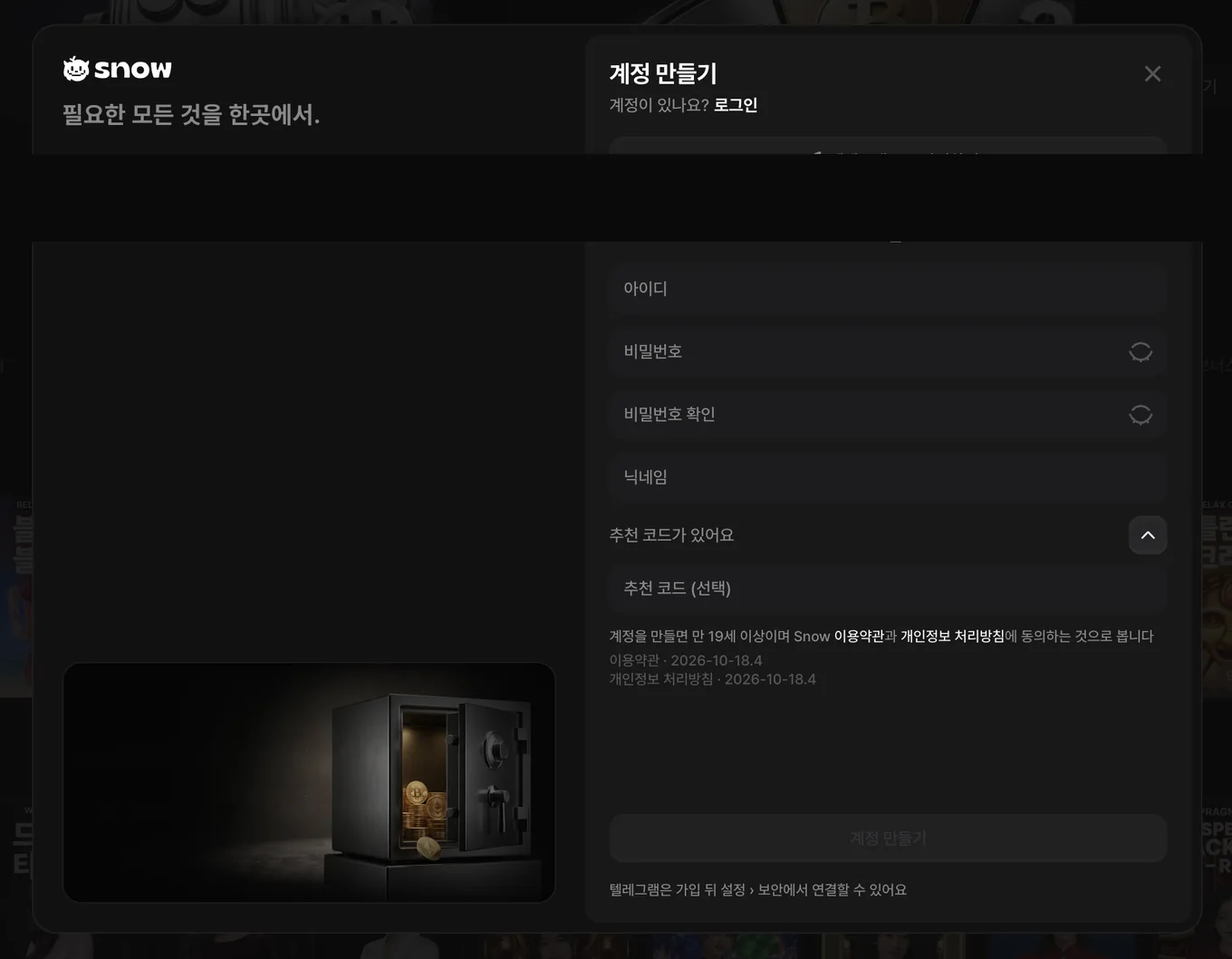
▲ SNOW create-account window: Telegram sign-up button and fields for username, password, confirm password and nickname Referral code (optional)
Expanding ‘I have a referral code’ reveals an optional field. Leave it empty if you have none; this page does not promote any code.
Accept the terms and pass the Cloudflare check
Beneath the line ‘By creating an account you confirm you are 19 or older and agree to Snow’s terms and privacy policy’, a Cloudflare check runs. Once it finishes, ‘Create account’ becomes clickable.
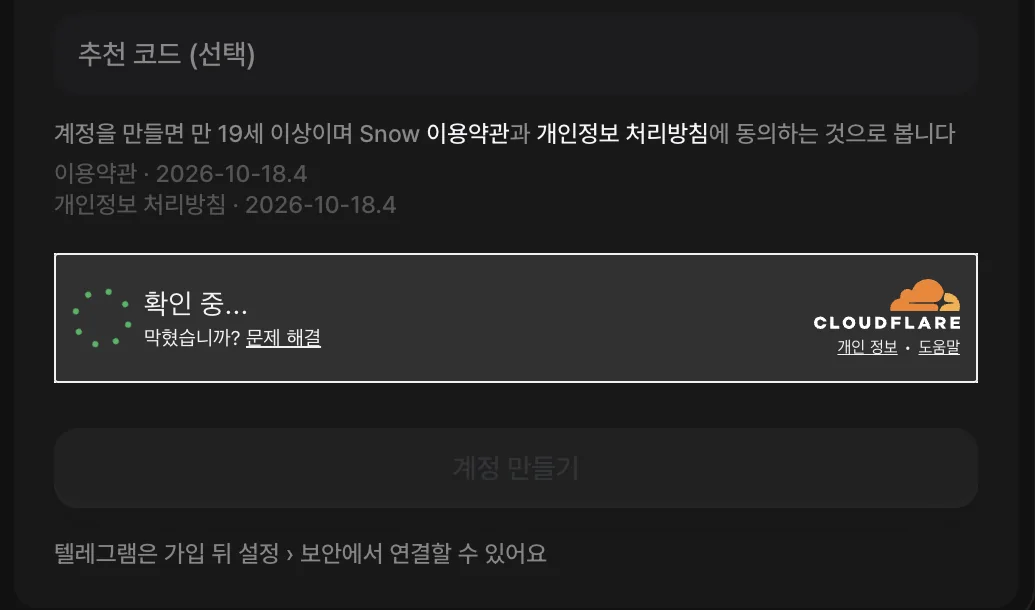
▲ Bottom of the sign-up window: Cloudflare ‘verifying’ box and terms version 2026-10-18.4 Create the account; link Telegram later
As the note at the bottom of the window says, Telegram can be linked afterwards under Settings › Security. Turning on two-factor authentication in the same place right after sign-up helps protect the account.
Sign-up fields at a glance
| Field | Required? | Rule we could confirm |
|---|---|---|
| Username | Required | What you log in with |
| Password | Required | Has a show/hide toggle |
| Confirm password | Required | Must match the password |
| Nickname | Required | Shown to other members, e.g. on the VIP leaderboard |
| Referral code | Optional | Expand ‘I have a referral code’ to enter it |
| Telegram | Optional | Sign up with the button, or link it later under Settings › Security |
| Age | Condition | 19 or older and of legal age where you live (terms, Art. 2) |
Logging in, resetting your password and two-factor authentication
The login window offers ‘Log in with Telegram’, username and password fields, ‘Forgot password?’ and a ‘Stay signed in on this device’ checkbox. Only tick it on a device you alone use.
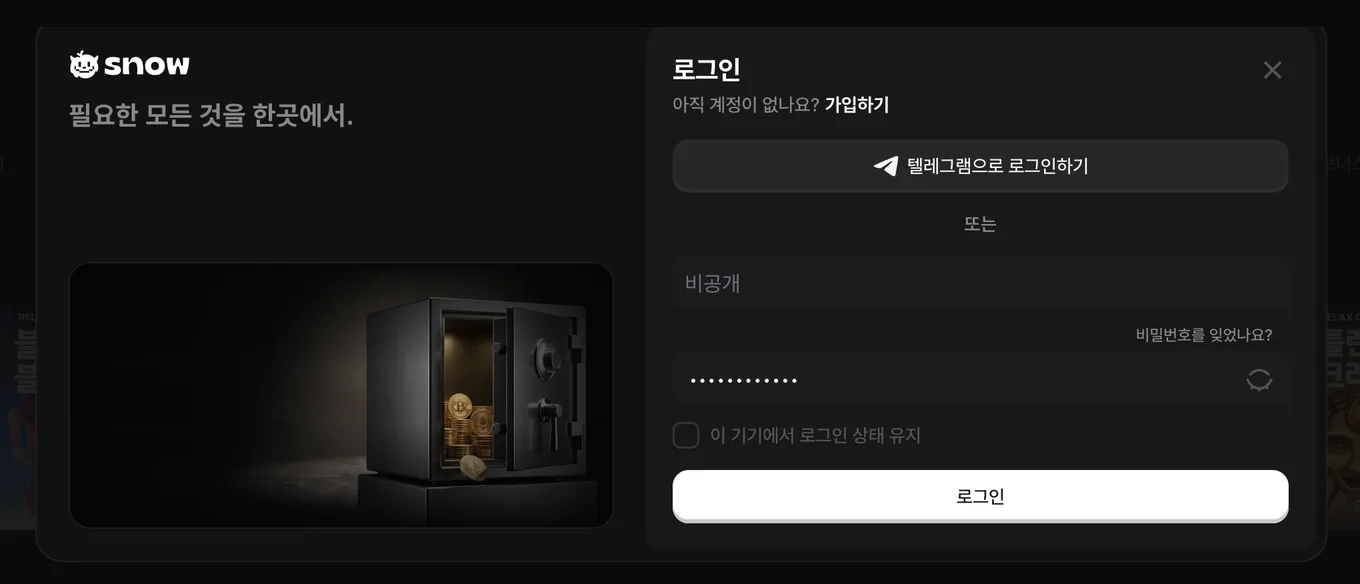
- Forgot your password. ‘Forgot password?’ → enter your username → six-digit code via your linked authenticator app, email or Telegram → set a new password. With no linked method, use a 1:1 support enquiry.
- The 24 hours after a reset. A new password set this way puts bank and crypto withdrawals on hold for 24 hours, and the screen shows when the hold ends. It also says to contact support if a withdrawal is urgent.
- Two-factor authentication. Under Settings › Security, scan the QR code with an app such as Google Authenticator; from then on every login asks for the app’s six-digit code. Keep the eight-digit recovery code somewhere safe in case you lose the app.
- If you suspect someone else logged in. Change your password and enable two-factor authentication under Settings › Security, then tell support.
If the site won’t open, try these first
- Make sure you typed snsn1.com/ko into the address bar yourself.
- Press ‘Clear cookies & cache’ at the bottom of the sidebar to clean up a stale session; it is there for frozen screens and tangled login states.
- Reopen the site in a new or private window.
- If the Cloudflare check never finishes, pause browser extensions such as ad blockers and reload.
- Still stuck? Use the 1:1 support enquiry. When we checked, Telegram chat, live chat and email support were all marked ‘coming soon’.
What to check on the first-deposit screen
After logging in, the Deposit button at the top right opens a window with Crypto and Bank tabs. The crypto tab says ‘Please check the coin and network you are depositing’, offers coin and network selectors and a ‘Show deposit address’ button. The table below translates the notes printed in the deposit window itself.
One caveat: on the same day, the footer of SNOW’s game pages read ‘Log in to play. Deposits, withdrawals and bonuses are being prepared and will run under the published terms once they open’. The deposit window opens, but we could not confirm that deposits are actually being processed, so ask through the 1:1 enquiry before sending anything.
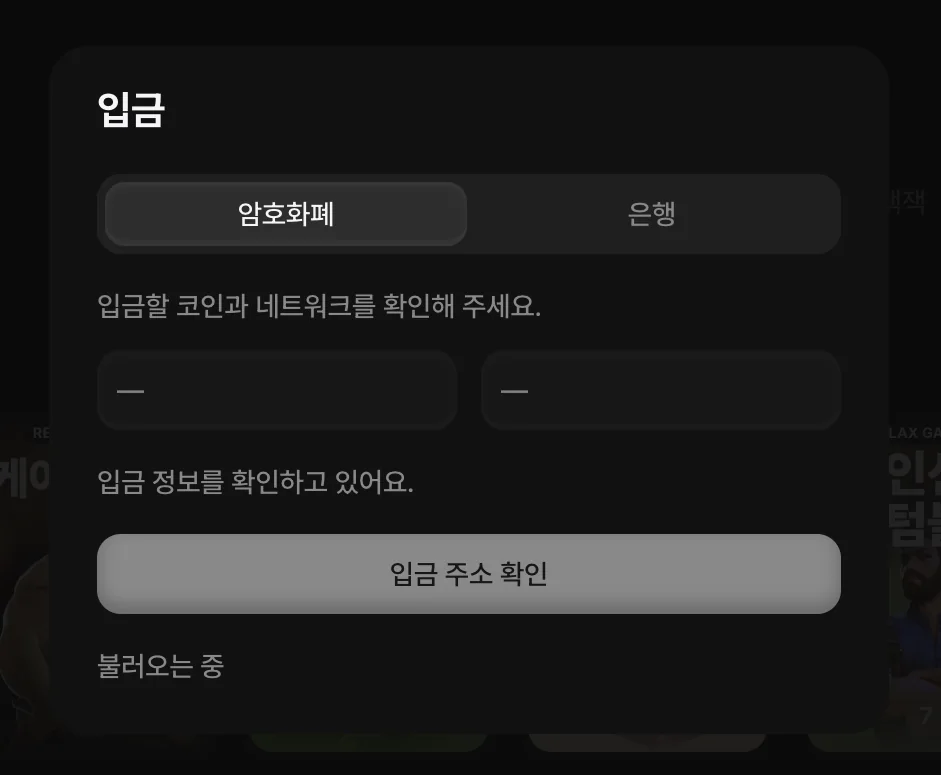
| Item | What the deposit window says |
|---|---|
| Tabs | Crypto and Bank (the Bank tab needs ID verification first) |
| Choosing a coin | Pick the coin and network, then press ‘Show deposit address’ |
| Wrong network | A warning that coins sent on another coin or network may be impossible to recover |
| Crediting | Not automatic; staff check and approve each deposit |